Smashpad: A Toddler-Proof Notepad for Emacs
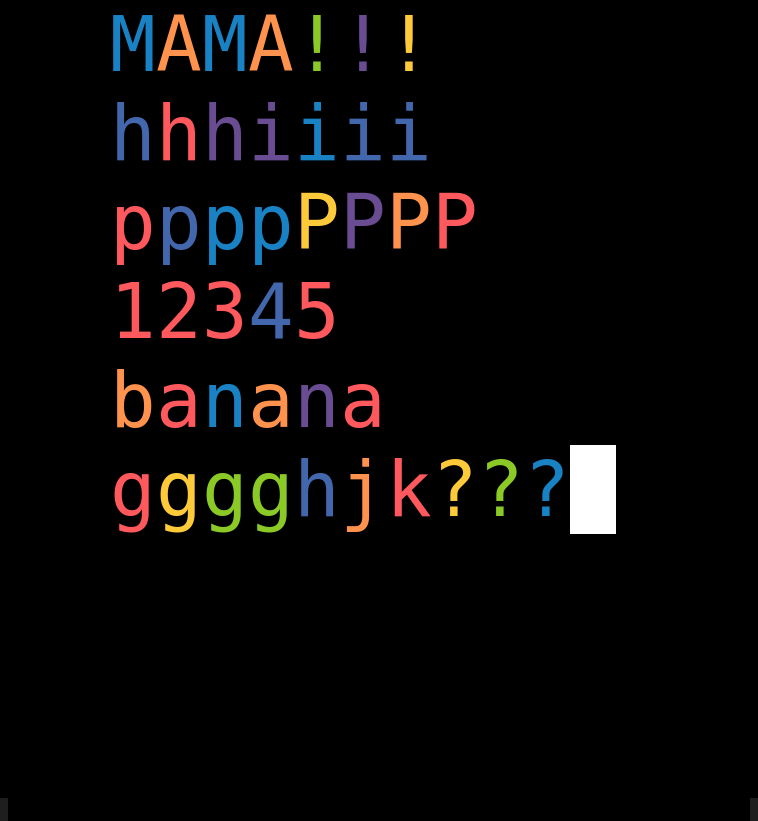
Toddlers love keyboards - especially the one you’re using, ideally while your drafting an email to the boss.
So I built smashpad, a small Emacs minor mode. Run M-x smashpad and Emacs opens a fullscreen frame with huge, centred letters, each one a random colour. Every key a toddler can hit types a letter or does nothing. C-x C-c does nothing. M-x does nothing. Clicking the window’s close button does nothing. The only way out is a key combination small hands won’t hit by accident.
It’s on GitHub and is under 300 lines of Elisp.
What it does
- Opens a new fullscreen frame with no menu bar, toolbar, scroll bars, mode line or fringes.
- Shows text at four times the normal size, with wide margins so it sits in the middle of the screen.
- Gives each letter a random colour from a rainbow palette.
- Types letters, numbers and symbols. Enter starts a new line, Tab adds a space and Backspace deletes.
- Ignores everything else - every chord, function key and mouse click.
- Exits when you press Ctrl+Shift+p three times in a row. Any other key in between resets the count, so random mashing won’t get out.
It uses its own *smashpad* buffer rather than *scratch*, so your scratch notes are safe. When you exit, the frame closes and the buffer stays, in case you want to keep the masterpiece.
Installing it
With use-package and the vc backend (Emacs 30+):
(use-package smashpad
  :vc (:url "https://github.com/timotaysci/smashpad"))
Or clone it and point load-path at it:
(use-package smashpad
  :load-path "~/path/to/smashpad"
  :commands (smashpad smashpad-mode))
Then M-x smashpad and hand over the keyboard.
How the lockdown works
Each time you press a key, Emacs looks it up in a stack of keymaps: the minor modes, the major mode, the global map, and so on. The first map in the stack with a binding wins. At the very top of that stack is a variable called overriding-terminal-local-map. It beats everything - minor modes, Evil, even the minibuffer. Emacs mostly uses it for short-lived things like C-u and transient menus.
Smashpad puts its own keymap there. That keymap has exactly one binding:
(defvar smashpad-lock-map
  (let ((map (make-sparse-keymap)))
    (define-key map [t] #'smashpad-handle-key)
    map))
The [t] is a default binding: it matches any event the map doesn’t otherwise bind. Since the map binds nothing else, it matches every event. So C-x, M-x, C-g, C-h, <f1>, mouse clicks - all of them go to one function, smashpad-handle-key. That function types the printable characters and drops the rest.
There’s a nice side effect. Because C-x is bound to smashpad-handle-key, it is no longer a prefix key. Emacs never waits for the second half of C-x C-c, so there’s no way to build up a dangerous key sequence one key at a time.
The keys that skip the keymap stack
A few events don’t go through ordinary keymaps at all. They go through special-event-map instead. The one that matters here is delete-frame, which is what Emacs receives when you click the window’s close button. Smashpad binds delete-frame and iconify-frame to ignore while it’s running, and puts the original bindings back when it exits.
As a belt-and-braces measure, a post-command-hook checks after every command that the lock is still in place, and puts it back if anything replaced it.
Function keys
Graphical Emacs sends some keys as symbols - return, backspace, tab, kp-1 - and normally translates them to characters through local-function-key-map. That translation only happens when a key is unbound, and with the default binding nothing is unbound. So the handler does the translation itself:
(defun smashpad--normalize-event (event)
  (let ((tr (and (symbolp event)
                 (lookup-key local-function-key-map (vector event)))))
    (if (and (arrayp tr) (= (length tr) 1) (characterp (aref tr 0)))
        (aref tr 0)
      event)))
Without this, the number pad wouldn’t type anything - and the number pad is a toddler favourite.
Getting out
The exit check compares the key that was just pressed with the exit key, and counts how many times in a row it’s been pressed:
(if (equal (this-single-command-keys) (smashpad--exit-key-vector))
    (progn
      (setq smashpad--exit-count (1+ smashpad--exit-count))
      (when (>= smashpad--exit-count smashpad-exit-presses)
        (smashpad-mode -1)))
  (setq smashpad--exit-count 0)
  ...)
Ctrl+Shift+p on its own is quite hard to hit with a palm. Three times in a row, with nothing else in between, is very unlikely.
The emergency exit
Locking your own editor is a slightly nervous thing to do. If something goes wrong, you can always turn it off from a terminal:
emacsclient -e '(smashpad-mode -1)'This works because the Emacs server evaluates the expression directly, outside the keyboard command loop - so the locked keymap never gets a say. I run Emacs as a daemon, so emacsclient is always available. Keep a terminal handy the first time you try it.
Testing a lockdown
The project has an ERT test suite, and the most useful trick was execute-kbd-macro. It feeds keys through the real Emacs command loop - keymap lookup and all - so the tests press keys exactly as a toddler would:
(ert-deftest smashpad-test-dangerous-keys-swallowed ()
  (smashpad-test--with-mode
    (smashpad-test--type "C-x b C-x k M-x C-x 0 C-a C-e C-z q")
    (should smashpad-mode)
    (should (equal (smashpad-test--text) "bk0q"))))
The b, k, 0 and q get typed and everything else is dropped, so the mode is still on afterwards. One thing I deliberately didn’t test is C-x C-c itself. If the lock ever broke, that test would quit Emacs mid-run, and the batch run can exit with a success code - a false pass. Testing that C-x is bound to the handler covers the same ground safely.
The suite runs with make test, and there are tests for the exit count, plain C-p not counting as the exit key, and everything being restored properly on exit.
What it can’t block
Emacs only sees the keys your desktop passes to it. Shortcuts handled by the operating system or window manager never reach Emacs: Super, Alt+Tab, Ctrl+Alt+Del, Ctrl+Alt+F1-F7 for switching consoles, and the power button. If your toddler finds those, you’ll need to turn the shortcuts off for the session or use a proper kiosk tool.
In a text terminal, Ctrl+Shift+p looks exactly the same as Ctrl+p, so the default exit key only works in graphical Emacs. You can set smashpad-exit-key to something else if you need to.
Built with Claude Code
I built this with Claude Code. I described what I wanted - a minor mode, big centred text, locked down, a hard-to-hit exit - and it wrote the mode, the tests, the README and a script that takes the screenshots in this post. The test suite caught one mistake along the way, though it was in the test rather than the mode: a 0 in the key sequence that should have been typed and was.
Was it worth it?
Yes. It took an evening, and I learnt more about how Emacs looks up keys than I had in years of using it.
The code is on GitHub. Suggestions and pull requests welcome - especially if you find a key it doesn’t catch.
Comments
Loading comments…